
How to make posting in process?
Posting could transform daily work information, including accounts receivable, accounts payable and petty cash…, into vouchers to Vital General Ledger.
1. Pre-set
1) Please go to [Maintenance> Parameter setting], and check [Transfer to general ledger] to posting method and [By date] or [By transaction] of method of generate voucher.

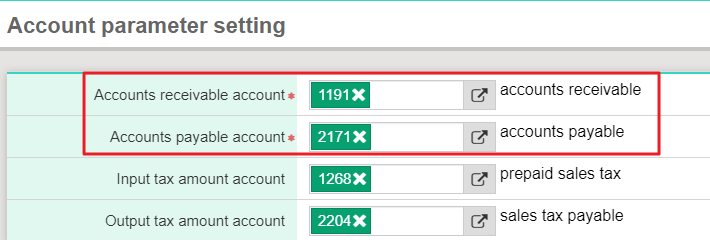
2) Please note that while posting for the first time, please go to [Maintenance>Account parameter setting] to check if corresponding account code of accounts receivable and accounts payable is right or not.
2. Posting
1) Please go to [Daily work>Posting], and check [Data category] and [Date] you would like to deal with.
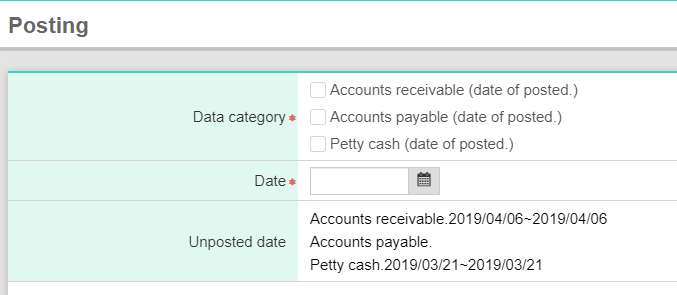
*Please make sure the company book is used in GL before posting.
*Please click [Maintenance> Company setting> Query] in GL, and the system will show every book. Find the one you use in AP/AR, and click [Edit] on the left. After entering the page, please check if [Using] is checked in [Use] field.